
With udyogX you can easily delete an registration. To do this first log in to the software entering your username and password.
Stepwise Guide #
1. Go to the “Registration” module and click on “View List.”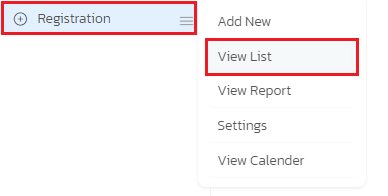
2. The registration list will be displayed.
3. Find the student’s name in the list, and next to it, you will see a filter arrow.
4. Click on the filter arrow to access various filter options.
5. Among the filter options, you will find “Delete” as the last option.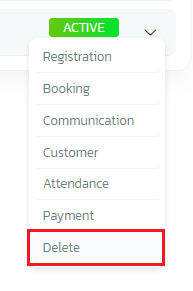
6. Select the “Delete” option to delete the student’s entry.
By following these steps, you can delete a student’s entry from the registration list in the software.


