
Instructions #
Log in to the software entering your username and password.
- In the left sidebar menu, go to ‘Communication > Settings’.
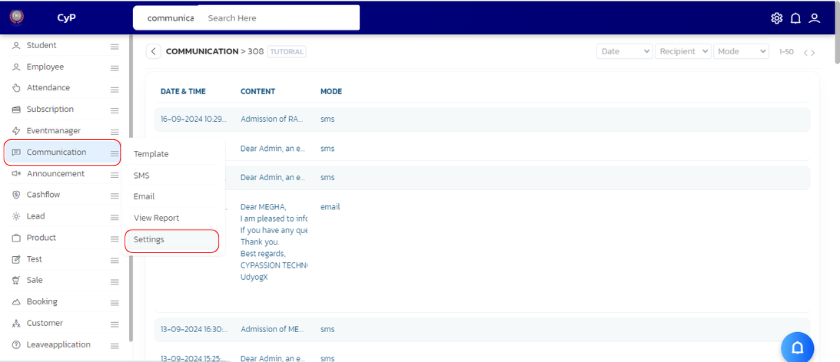
- A settings page will appear.
- Adjust the settings as per your choice and click on ‘Save’.
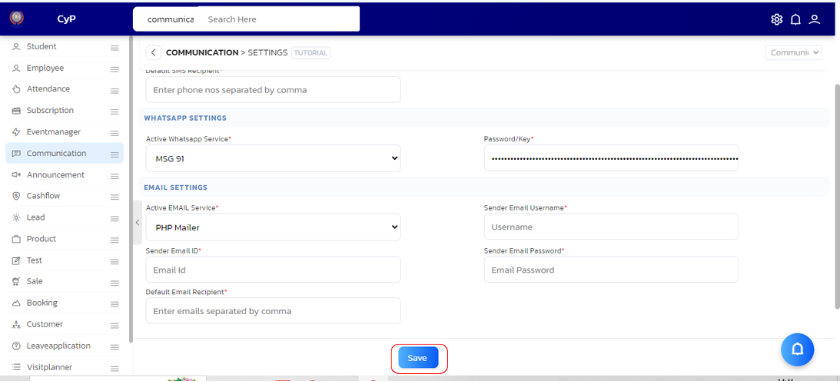
| S.No | Setting Name | Description |
|---|---|---|
| 1 | Active SMS Service* | |
| 2 | SMS PE ID | |
| 3 | SMS Shortcode | |
| 4 | Username | |
| 5 | Password/Key | |
| 6 | Credits Remaining | |
| 7 | Default SMS Recipient | |
| 8 | Active EMAIL Service | |
| 9 | Sender Email Username* | |
| 10 | Sender Email ID | |
| 11 | Sender Email Password | |
| 12 | Default Email Recipient |


